Cannot drop database because it is currently in use:
USE master;
GO

ALTER DATABASE dbname SET SINGLE_USER WITH ROLLBACK IMMEDIATE;
GO
DROP DATABASE dbname;
GO
Generate insert statements from existing table data
How to generate Insert statements from table data using SQL Server
Postgres
psql: FATAL: role “postgres” does not exist
brew install postgresql
brew services start postgresql
initdb /usr/local/var/postgres
sudo chown -R $(whoami):admin /usr/local/*
/usr/local/opt/postgres/bin/createuser -s postgres
Joins

Indexes

Optimising SQL
𝗧𝗼𝗽 𝟮𝟬 𝗦𝗤𝗟 𝗤𝘂𝗲𝗿𝘆 𝗢𝗽𝘁𝗶𝗺𝗶𝘇𝗮𝘁𝗶𝗼𝗻 𝗧𝗲𝗰𝗵𝗻𝗶𝗾𝘂𝗲𝘀
Here is the list of the top 20 SQL query optimization techniques I found noteworthy:
- Create an index on huge tables (>1.000.000) rows.
- Use EXIST() instead of COUNT() to find an element in the table.
- SELECT fields instead of using SELECT *
- Avoid Subqueries in WHERE Clause
- Avoid SELECT DISTINCT where possible.
- Use the WHERE Clause instead of HAVING.
- Create joins with INNER JOIN (not WHERE)
- Use LIMIT to sample query results.
- Use UNION ALL instead of UNION wherever possible.
- Use UNION where instead of WHERE … or … query.
- Run your query during off-peak hours.
- Avoid using OR in join queries.
- Choose GROUP BY over window functions.
- Use derived and temporary tables.
- Drop the index before loading bulk data.
- Use materialized views instead of views.
- Avoid != or <> (not equal) operator
- Minimize the number of subqueries.
- Use INNER join as little as possible when you can get the same output using LEFT/RIGHT join?
- Frequently try to use temporary sources to retrieve the same dataset.
Dr. Milan Milanović on Twitter
Triggers
A trigger is a special type of stored procedure that automatically runs when an event occurs in the database server.
I have used them before to create audit logs for production data, e.g. on insert, update, delete, trigger an audit log entry capturing metadata about the change like a before and after of the change, who made the change, when it happened etc.
Notify / listen (Postgres)
The NOTIFY command sends a notification event together with an optional “payload” string to each client application that has previously executed LISTEN ***channel*** for the specified channel name in the current database. Notifications are visible to all users.
The practice shows that it is not sufficient just to set it up and listen for the events, because every so often the channel goes down, due to various communication problems. - https://stackoverflow.com/a/36774809
Coalesce
The COALESCE function accepts an unlimited number of arguments. It returns the first argument that is not null. If all arguments are null, the COALESCE function will return null.
We often use the COLAESCE function to substitute a default value for null values when we querying the data. For example, we want to display the excerpt from a blog post, if the excerpt is not provided, we can use the first 150 characters of the of the content of the post. To achieve this, we can use the COALESCE function as follows:
SELECT
	COALESCE (excerpt, LEFT(CONTENT, 150))
FROM
	posts;
Joins
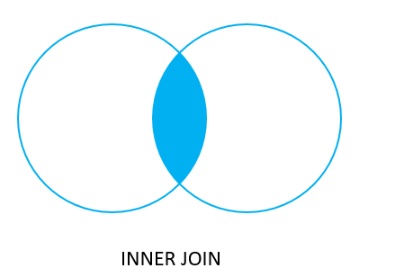
Inner join
A INNER JOIN creates a new result table by combining column values of two tables (table1 and table2) based upon the join-predicate. The query compares each row of table1 with each row of table2 to find all pairs of rows, which satisfy the join-predicate. When the join-predicate is satisfied, column values for each matched pair of rows of table1 and table2 are combined into a result row.
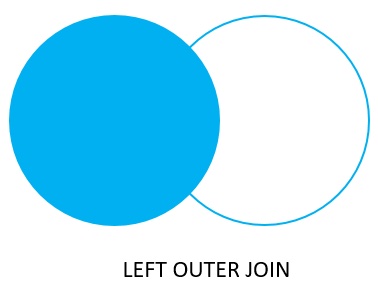
Left join (or left outer join)
In case of LEFT OUTER JOIN, an inner join is performed first. Then, for each row in table T1 that does not satisfy the join condition with any row in table T2, a joined row is added with null values in columns of T2. Thus, the joined table always has at least one row for each row in T1.
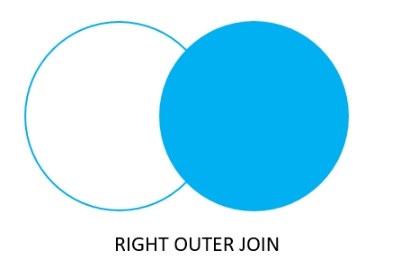
Right join (or right outer join)
First, an inner join is performed. Then, for each row in table T2 that does not satisfy the join condition with any row in table T1, a joined row is added with null values in columns of T1. This is the converse of a left join; the result table will always have a row for each row in T2.
Full outer join
The full outer join or full join returns a result set that contains all rows from both left and right tables, with the matching rows from both sides if available. In case there is no match, the columns of the table will be filled with NULL.