Man pages
set -e, -u, -o, -x pipefail explanation
Special parameters
Array expansion
${SOME_ARRAY[@]}
Returning values from script
// some behavior

echo "$WHATEVER"
Linting
koalaman/shellcheck, available as a docker image, see Linting
Script arguments
Take the nth argument onwards
${@:2} - would take only argument 2 and on
e.g.
Say we had a script run-stuff.sh:
docker run \
	--rm \
	"sometag:someversion" \
	"${@:2}"
We can call it like this:
/path/to/run-stuff.sh "some argument" "some other argument" "a third argument"And only "some argument" and "a third argument" would be passed to the docker run command.
Conditionals
Check for empty array
if [ ${#SOME_ARRAY[@]} -eq 0 ]; then
Check for absence of a file (remove ! to check for existence)
if [ ! -f /path/to/file ]; then
chmod +x vs. chmod 755
What is the difference between “chmod +x” and “chmod 755”?
Code churn
Intuition is great but we often forget that we can use churn stats too.
find . -name "*.rb" |xargs -n1 -I file sh -c 'echo `git log --oneline file | wc -l`: file'|sort -nrApplying a time period window is good too as some parts of code churn for a while and them reach stability.
Intuition is great but we often forget that we can use churn stats too. find . -… | Hacker News
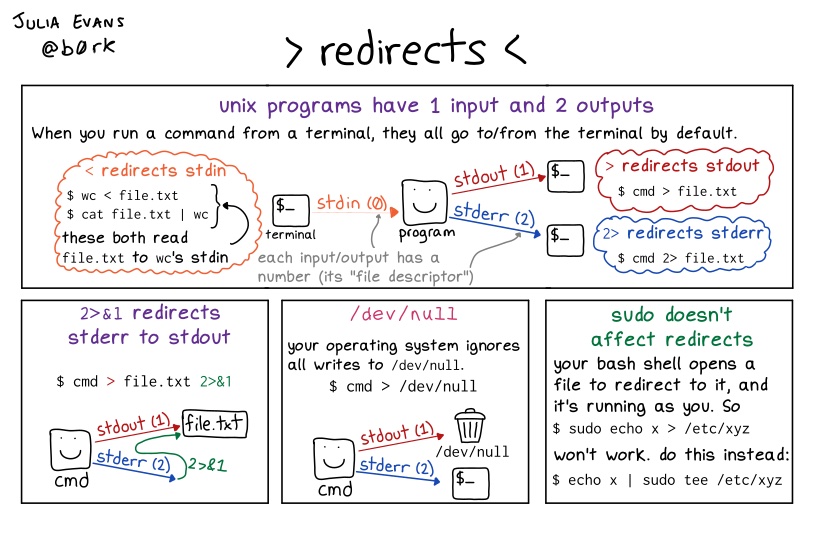
Bash redirects
Read contents of gzipped file without unzipping
zcat file | less - can obviously also be chained with grep
Grep through all gzipped files in a directory
find . -name \*.gz -print0 | xargs -0 zgrep --line-number "{search pattern}”
Grep through non-gzipped files in a directory
find . -name \*.{file ext} -print0 | xargs -0 grep --line-number "{search pattern}”